Tatro, Andrew
Go to Person RecordCensus Scope
- Year1910
- PlaceSchenectady County, Schenectady, Ward 4
- Census ScopeWard 4 ED 188 Sheet 1B #60
- Dwelling8
- Family No.10
Location
- Address
- LocalitySchenectady
- Institutionblank
Name
- Last NameTatroColumn 3
Names are listed in the following order: Last, First, Middle. If several members of a family have the same last name, the last name will be listed in the first record only and in following records it might be replaced by a line or a blank space. If the name is hard to read, attempt to verify the spelling with the city directory where possible. Note: If you see a last name that looks crossed out because it was written over that line, enter it as the last name. Sometimes the enumerator drew the lines first for the last name of all the people in the household, and then had to write a new last name over the line to indicate a person had a different last name. These were written over the line, not crossed out.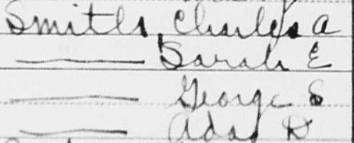
- First NameAndrewColumn 3
Names are listed in the following order: Last, First, Middle. If several members of a family have the same last name, the last name will be listed in the first record only and in following records it might be replaced by a line or a blank space. If the name is hard to read, attempt to verify the spelling with the city directory where possible. Note: If you see a last name that looks crossed out because it was written over that line, enter it as the last name. Sometimes the enumerator drew the lines first for the last name of all the people in the household, and then had to write a new last name over the line to indicate a person had a different last name. These were written over the line, not crossed out. - Middle NameblankColumn 3
Names are listed in the following order: Last, First, Middle. If several members of a family have the same last name, the last name will be listed in the first record only and in following records it might be replaced by a line or a blank space. If the name is hard to read, attempt to verify the spelling with the city directory where possible. Note: If you see a last name that looks crossed out because it was written over that line, enter it as the last name. Sometimes the enumerator drew the lines first for the last name of all the people in the household, and then had to write a new last name over the line to indicate a person had a different last name. These were written over the line, not crossed out. - TitleblankColumn 3
Enter a title in HistoryForge only if it is entered on the census sheet. - SuffixblankColumn 3
Enter a suffix in HistoryForge only if it is entered on the census sheet.
Relation
- Relation to HeadLodgerColumn 4
Enter what you see on the census. If this field is blank enter the word Blank so you can save it.
Note: This field has a controlled vocabulary. If, as you enter the term from the census, the term does not appear from the list of controlled vocabulary, enter an X in the field and enter “relation to head is ____” in the notes field.
Personal Description
- M - MaleColumn 5
Select the option that corresponds to the answer on the census.
The scribble for “Unknown” often looks like this: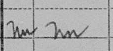
- W - WhiteColumn 6
Select the option that corresponds to the answer on the census.
The scribble for “Unknown” often looks like this: - Age32Column 7
Enter what you see on the census. If the field is blank, leave blank. If the answer is Un (Unknown) enter 999. A child that is less than two years of age will be listed by their age in months on the census i.e., 1 and 3/12. If the age is entered this way on the census, enter the years in the Age field and the months in the Age (months) field on HistoryForge.
The scribble for “Unknown” often looks like this: - Age (Months)blankColumn 7
Enter what you see on the census. If the field is blank, leave blank. If the answer is Un (Unknown) enter 999. A child that is less than two years of age will be listed by their age in months on the census i.e., 1 and 3/12. If the age is entered this way on the census, enter the years in the Age field and the months in the Age (months) field on HistoryForge.
The scribble for “Unknown” often looks like this: - M or M1 - 1st MarriageColumn 8
Select the option that corresponds to the answer on the census.
The scribble for “Unknown” often looks like this: - Years of Present Marriage5Column 9
Enter what you see on the census. If the field is blank on the census, leave it blank on HistoryForge. If the answer is Un (Unknown) enter 999.
The scribble for “Unknown” often looks like this: - No. Children BornblankColumn 10
Enter what you see on the census. If the field is blank on the census, leave it blank on HistoryForge. If the answer is Un (Unknown) enter 999.
The scribble for “Unknown” often looks like this: - No. Children AliveblankColumn 11
Enter what you see on the census. If the field is blank on the census, leave it blank on HistoryForge. If the answer is Un (Unknown) enter 999.
The scribble for “Unknown” often looks like this:
Place of Birth & Citizenship
- Place of BirthCanadaColumn 12
Enter what you see on the census. Note: This field has a controlled vocabulary. If, as you enter the term from the census, the term does not appear from the list of controlled vocabulary, enter an X in the field and enter “Place of Birth is ____” in the notes field.
The scribble for “Unknown” often looks like this: - Mother TongueEnglishColumn 12
Generally, for foreign born only. Enter what you see on the census. If the enumerator wrote un (see below) or don’t know enter Unknown. Note: This field has a controlled vocabulary. If, as you enter the term from the census, the term does not appear from the list of controlled vocabulary, enter an X in the field and enter “Mother Tongue is ____” in the notes field.
The scribble for “Unknown” often looks like this: - Place of Birth - FatherCanadaColumn 13
Enter what you see on the census. Note: This field has a controlled vocabulary. If, as you enter the term from the census, the term does not appear from the list of controlled vocabulary, enter an X in the field and enter “Place of Birth is ____” in the notes field.
The scribble for “Unknown” often looks like this: - Mother Tongue - FatherEnglishColumn 13
Generally, for foreign born only. Enter what you see on the census. If the enumerator wrote un (see below) or don’t know enter Unknown. Note: This field has a controlled vocabulary. If, as you enter the term from the census, the term does not appear from the list of controlled vocabulary, enter an X in the field and enter “Mother Tongue is ____” in the notes field.
The scribble for “Unknown” often looks like this: - Place of Birth - MotherCanadaColumn 14
Enter what you see on the census. Note: This field has a controlled vocabulary. If, as you enter the term from the census, the term does not appear from the list of controlled vocabulary, enter an X in the field and enter “Place of Birth is ____” in the notes field.
The scribble for “Unknown” often looks like this: - Mother Tongue - MotherEnglishColumn 14
Generally, for foreign born only. Enter what you see on the census. If the enumerator wrote un (see below) or don’t know enter Unknown. Note: This field has a controlled vocabulary. If, as you enter the term from the census, the term does not appear from the list of controlled vocabulary, enter an X in the field and enter “Mother Tongue is ____” in the notes field.
The scribble for “Unknown” often looks like this: - YesThere is no corresponding field on the census. Check the box if the individual was not born in the United States and does not have the designation “Am Cit” after their place of birth.
- Year ImmigratedblankColumn 15
Enter what you see on the census. If the field is blank on the census, leave it blank on HistoryForge. If the answer is Un (Unknown) enter 999.
The scribble for “Unknown” often looks like this: - blankColumn 16
Select the option that corresponds to the answer on the census.
The scribble for “Unknown” often looks like this: - Language SpokenEnglishColumn 17
Enter what you see on the census. If the enumerator wrote un (see below) or don’t know enter Unknown. Note: This field has a controlled vocabulary. If, as you enter the term from the census, the term does not appear from the list of controlled vocabulary, enter an X in the field and enter “Language spoken is ____” in the notes field.
The scribble for “Unknown” often looks like this:
Occupation, Industry, Education and Employment Status
- OccupationPainterColumn 18
Enter what you see on the census. If the field is blank on the census, leave the default “None.” If, however, the industry is not blank or there is some other indicator of an occupation enter the word “Blank” to indicate that there was an occupation. - IndustryHouse PainterColumn 19
Enter what you see on the census. If the field is blank on the census, leave it blank on HistoryForge.
The scribble for “Unknown” often looks like this: - OA - Own AccountColumn 20
Select the option that corresponds to the answer on the census.
The scribble for “Unknown” often looks like this: - blankColumn 21
Check the box if the response is yes. - Unemployed Weeks (1909)0Column 22
Enter what you see on the census. If the field is blank on the census, leave it blank on HistoryForge.
The scribble for “Unknown” often looks like this: - YesColumn 23
Check the box if the response is yes. - YesColumn 24
Check the box if the response is yes. - blankColumn 25
Check the box if the response is yes.
Household Data
- blankColumn 26
Select the option that corresponds to the answer on the census. Note: This information should only be entered once for the family/household.
The scribble for “Unknown” often looks like this: - blankColumn 27
Select the option that corresponds to the answer on the census. Note: This information should only be entered once for the family/household.
The scribble for “Unknown” often looks like this: - Farm No.blankColumn 29
Enter what you see on the census. If the field is blank on the census, leave it blank on HistoryForge. If the answer is Un (Unknown) enter 999.
The scribble for “Unknown” often looks like this:
More Personal Data
- blankColumn 30
Select the option that corresponds to the answer on the census. *Note: Columns 30-32 will sometime include a series of annotations rather than responses to the questions themselves (see image below). These annotations were the key-punch symbols used for post-enumeration processing of the census. If this is the case, do not check the boxes and do not enter this information into the Notes field.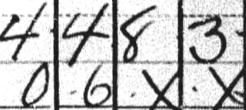
The scribble for “Unknown” often looks like this: - blankColumn 31
Select the option that corresponds to the answer on the census. *Note: Columns 30-32 will sometime include a series of annotations rather than responses to the questions themselves (see image below). These annotations were the key-punch symbols used for post-enumeration processing of the census. If this is the case, do not check the boxes and do not enter this information into the Notes field. - blankSelect the option that corresponds to the answer on the census. *Note: Columns 30-32 will sometime include a series of annotations rather than responses to the questions themselves (see image below). These annotations were the key-punch symbols used for post-enumeration processing of the census. If this is the case, do not check the boxes and do not enter this information into the Notes field.
Additional
- Notes
If you find additional or conflicting information about the person such as a different name spelling or address, include the information as written by the enumerator in the relevant field(s) and enter the alternative information here and its source. If you checked the city directory, include the year, i.e., The address in the 1919 City Directory is _______.
*Important - the information in the notes field will become public.
Other Family Members
| Name | Sex | Age | Relation | Occupation |
|---|---|---|---|---|
| Siver, Delilah K | Female | 57 | Head | Keeper |
| Miner, Frederick | Male | 50 | Lodger | Mason |
| Miner, Nellie | Female | 31 | Lodger | Chambermaid |
| Eggleston, Clifford C | Male | 29 | Lodger | Carpenter |
| Wheeler, William | Male | 29 | Lodger | Machinist |
| Barton, John W | Male | 26 | Lodger | Teamster |
| Shaw, Burdell | Male | 27 | Lodger | Painter |
| Shaw, Ida | Female | 22 | Lodger | None |
| Newman, Bernard | Male | 34 | Lodger | Machinist |
| Henry, Lansing | Male | 40 | Lodger | Painter |
| Bauer, William | Male | 43 | Lodger | Barber |
| Bauer, Margaret | Female | 40 | Lodger | None |
| Bauer, Edward | Male | 10 | Lodger | None |
| Ahrens, Charles F | Male | 27 | Lodger | Painter |
| Ahrens, Jennie T | Female | 25 | Lodger | None |
| Ahrens Jr, Charles F | Male | 5 | Lodger | None |
| Ahrens, Irvan | Male | 2 | Lodger | None |
| Corcoran, William | Male | 30 | Lodger | Machinist |
| Walsh, Michael | Male | 34 | Lodger | Bar Tender |
| Walsh, Margaret | Female | 22 | Lodger | None |
| Hickey, Edward F | Male | 28 | Lodger | Musician |
| Hickey, Jennie M | Female | 23 | Lodger | None |
| Comnely, Alice | Female | 50 | Servant | House maid |
| Short, Theodore L | Male | 40 | Lodger | Lather |
| Wheeler, James T | Male | 29 | Lodger | Toolmaker |
| Hack, Cynthia J | Female | 56 | Lodger | Laundress |
| Lyons, John | Male | 48 | Lodger | Bartender |
| Clute, Robert J | Male | 26 | Lodger | Fireman |
| Clute, Cicelia | Female | 24 | Lodger | Collar Maker |
| Henry, Charles | Male | 16 | Lodger | Painter |
| Tatro, Cecilia | Female | 34 | Lodger | None |
| La Viere, Joseph | Male | 26 | Lodger | Steeple Climber |
| Read, Rosa | Female | 34 | Lodger | None |
| Read, Mary | Female | 32 | Lodger | None |
| Read, Stella May | Female | 4 | Lodger | None |
| Read, Thelma | Female | 2 | Lodger | None |